One event. Every stage. One file.
A wedding with three stages, a gala with a reception band and a headliner, a festival day – plan them together, not in five separate documents.
Try it free Play with a live stage →Free to start · email sign-in · no card · also on iPhone & iPad
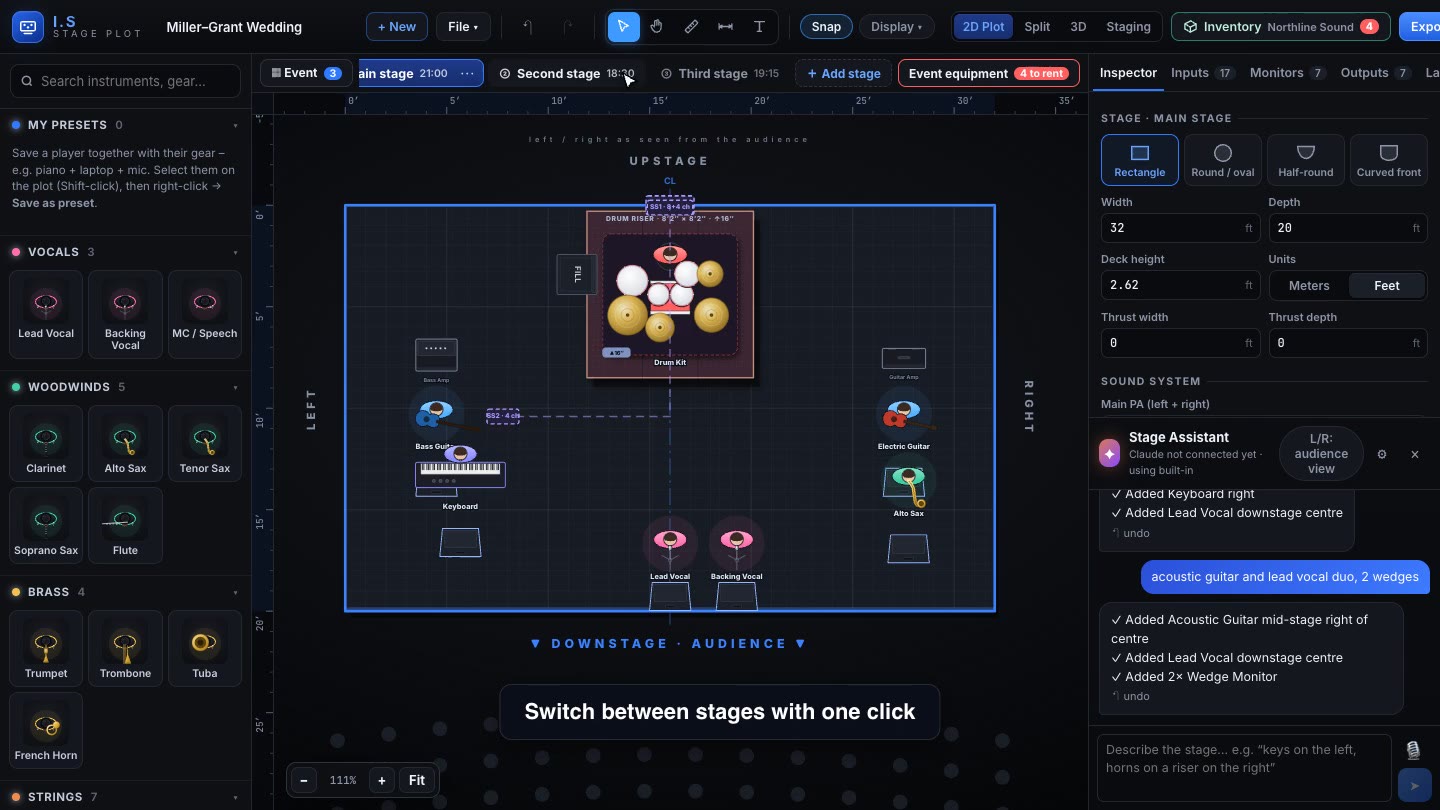
Every stage has its own plot and time
Add a Main stage, a Second stage, a Third stage – or your own names – and switch between them with one click. Each keeps its own size, players, inputs, cabling and time.
One equipment list
Gear moves from stage to stage? Then only the busiest stage counts. All stages at the same time? Then the gear adds up – and you see exactly what to rent.
One rider for everyone
The technical rider opens with an event overview – every stage side by side and the running order – then each stage’s plot, input list, monitors and 3D views.
See it in action
Questions & answers
Can one event have several stages?
Yes – a main stage, a second stage, a third stage or your own names, each with its own plot, inputs and time. The event equipment list adds them up, or counts only the busiest stage when the gear moves between stages.
Does it make a technical rider?
Yes. One PDF with the stage plot, numbered input list (with 48V, mic and stand per channel), monitor mixes, output list, power and 3D views – for every stage of the event. You can also send a link instead of a file.
Try it free Play with a live stage →Free to start · email sign-in · no card · also on iPhone & iPad